Building a Sales Tech Stack That Doesn't Fight Itself
Most sales orgs run 12+ tools that duplicate data, contradict each other, and slow reps down. Here's how to architect a stack where every tool earns its seat.
Ava Sinclair
VP of Revenue Operations
I pulled up our last quarterly stack review and counted 14 active sales tools across the org. Fourteen. Annual spend north of $380K. When I asked reps which ones they actually used on a daily basis, the answer was four. Four tools out of fourteen. The other ten were either shelfware, admin-only utilities, or redundant systems that different teams had purchased at different times to solve the same problem.
This is not a budgeting failure. It is an architecture failure. When nobody designs how tools connect, share data, and stay in their lane, you end up with a Frankenstein stack that fights itself. Your CRM says one thing, your sequencer says another, and your reps stop trusting either. They revert to spreadsheets, gut instinct, and manual LinkedIn searches. You paid six figures for that outcome.
The fix is not buying another tool. It is applying an integration architecture to the tools you already own, killing the ones that do not earn their seat, and building clear data flow rules so every system agrees on what is true.
The $1.2M Integration Tax You're Already Paying
The average B2B sales org runs 12 to 15 tools in its stack (Gartner's 2025 Sales Technology Survey puts the median at 13). But tool count alone does not tell the story. The real damage happens in the spaces between tools, where data conflicts, sync failures, and manual workarounds pile up invisibly.
Here is the math nobody runs. Take a 20-rep team with an average fully loaded cost of $120K per rep. If each rep wastes 5 hours per week on data reconciliation, manual CRM updates, switching between tools, and hunting for the "right" contact record, that is 12.5% of their selling time gone. Across 20 reps, that totals roughly $300K in lost productivity per year. Add the $380K in licenses, $80K in admin hours to maintain integrations, and another $50K in data cleanup projects, and you are looking at over $800K annually. For larger orgs, this number easily crosses $1.2M.
The most corrosive part is not the dollar figure. It is what happens to rep behavior. When Outreach shows a prospect was contacted three days ago but Salesforce shows no activity, the rep does not investigate. They skip the account. When two enrichment tools return different job titles for the same person, the rep trusts neither. They open LinkedIn and do the research manually, negating the entire point of the enrichment tool.
The root cause is not too many tools. Plenty of high-performing teams run 8 to 10 tools effectively. The root cause is the absence of an integration architecture: a deliberate plan for which tool owns which data, how data flows between systems, and what happens when two systems disagree.
One Job Per Tool: The Ruthless Audit Framework
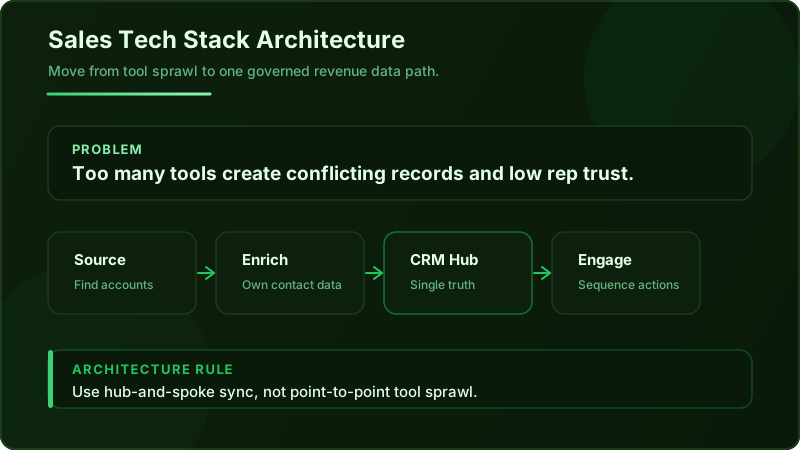
Every tool in your stack should map to exactly one primary function. I use five categories: source (find accounts and contacts), enrich (add firmographic, technographic, or intent data), engage (send emails, make calls, run sequences), track (log activities and deal progress), and analyze (report on performance, forecast revenue).
Pull up your tool inventory right now and assign each one a single primary category. If a tool spans two categories, pick the one it does best. The secondary capability is a bonus, not a justification for its existence.
The overlap test is simple. If two tools share the same primary function, run a 30-day bake-off using actual usage data. Not vendor demos, not feature comparison spreadsheets, not the opinion of the rep who was friends with the AE who sold it. Real data. For contact sourcing tools, compare match rates against your ICP. For engagement tools, compare reply rates on identical sequences. For enrichment tools, compare field fill rates on a sample of 500 accounts.
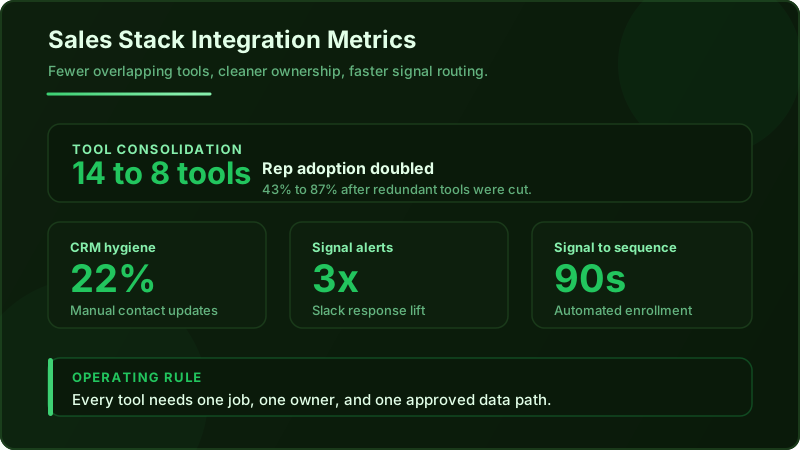
I ran this exercise at a previous company and the results were uncomfortable. We had ZoomInfo, Apollo, and Lusha all classified as "source/enrich" tools. Apollo had the best email accuracy for our mid-market ICP (92% deliverability vs. 84% for ZoomInfo and 79% for Lusha on a controlled test). But ZoomInfo had better org chart data for enterprise accounts. The decision: keep ZoomInfo for enterprise enrichment, keep Apollo for mid-market sourcing, cut Lusha entirely. We went from 14 tools to 8 in six weeks. Rep adoption of the remaining tools jumped from 43% to 87% because there was finally one clear path for each workflow.
How to Run the Bake-Off
- Define the metric before you start. For sourcing tools, it is deliverable email match rate against your ICP. For engagement tools, it is meetings booked per 100 contacts touched. For enrichment, it is field completeness percentage.
- Use identical inputs. Feed the same list of 500 target accounts into each competing tool.
- Measure over 30 days, not a single batch. Data quality varies by segment and time.
- Include admin burden. A tool that performs 5% better but requires 10 hours of weekly maintenance is not winning.
Hub-and-Spoke Beats Spaghetti Every Time
Point-to-point integrations are the default because they are the easiest to set up. Your sequencer connects to your CRM. Your enrichment tool connects to your sequencer. Your intent provider connects to Slack. Each connection is simple in isolation. But the combinatorics are brutal: 10 tools with point-to-point connections create up to 45 possible integration paths to build and maintain.
Hub-and-spoke architecture eliminates this complexity. Pick one system as your hub (usually your CRM or a data warehouse like Snowflake) and connect every other tool to it. Tools never talk to each other directly. They write to the hub, and the hub distributes to other tools based on defined rules.
The critical design decision is the canonical record rule: when two tools disagree on a data point (job title, email address, account owner, company size), which system wins? Without this rule, you get an endless tug-of-war where sync cycles overwrite good data with bad data and back again.
Here is how I define canonical ownership:
- Firmographic data (company size, industry, HQ location): the enrichment tool is the authority. It writes to the CRM. The CRM never overwrites these fields from any other source.
- Contact data (email, phone, job title): the enrichment or sourcing tool is the authority, with one exception: if a rep has directly confirmed updated information from a conversation, the CRM update wins (flagged as "rep-verified").
- Activity data (emails sent, calls made, meetings booked): the engagement tool is the authority. It writes to the CRM. The CRM is read-only for these fields.
- Deal data (stage, close date, amount): the CRM is the sole authority. No other tool writes to these fields.
The Contact Data Problem Nobody Admits
Contact data decays at 30% or more per year. People change jobs, get promoted, switch email addresses, and move companies. A 2025 Validity study found that the average CRM database has a 27% invalid email rate within 12 months of the last enrichment pass. That means more than a quarter of your prospecting list is dead on arrival.
The deeper problem is structural. When your sequencer (Outreach, Salesloft), your enrichment tool (ZoomInfo, Apollo), and your CRM all store their own copy of a contact record, you have three versions of truth. The sequencer has the email it used for the last sequence. The enrichment tool has the most recent data from its crawl. The CRM has whatever a rep or integration last wrote there.
The correct design pattern is a strict one-way data flow for contact records. Your enrichment or sourcing tool writes to the CRM. The CRM pushes contact data to the sequencer. The sequencer never writes contact data back to the CRM. Activity data (was the email opened, did the prospect reply) flows back from the sequencer to the CRM, but the contact record itself is read-only in the sequencer.
This pattern means your CRM always reflects the enrichment tool's most current data, and your sequencer always gets its contacts from the CRM. There is one version of truth, and it flows in one direction.
A platform with a large, continuously refreshed contact database (Greenway.ai maintains 270M+ contacts with ongoing verification) can collapse the enrichment and sourcing layers into a single system, which eliminates the reconciliation problem entirely. Instead of syncing data between three systems, you have one source that feeds the CRM, which feeds everything downstream.
Never allow your engagement tool to write contact-level data (email, phone, title, company) back to your CRM. Activity data flows back. Contact data does not. Violating this rule is the single most common cause of duplicate records, overwritten enrichment data, and the slow CRM decay that makes reps abandon the system entirely. Enforce this with field-level permissions, not team policies.
Signal Routing: Getting Intent Data to the Right Rep in Under 60 Seconds
Buying intent data is valuable only if it reaches a rep while the signal is still warm. Most orgs pay $30K or more per year for intent providers like Bombora or 6sense, then let the data sit in a dashboard that gets checked once a week during pipeline review. By then, the signal is cold and the competitor who acted on it two days ago already has the meeting.
Signal routing is the practice of automatically mapping an intent signal to a specific action, assigned to a specific rep, within a defined time window. Here are the three routing rules:
- Territory match. The signal must route to the rep who owns the account or territory. This sounds obvious but breaks constantly when territory assignments in your intent tool do not match your CRM. Use the CRM as the authority for territory ownership and sync it to your intent provider weekly.
- Account tier. A surge signal from a Tier 1 account (your top 50 targets) should trigger a different, higher-touch response than the same signal from a Tier 3 account. Build separate playbooks for each tier.
- Signal strength threshold. Not every intent spike deserves action. Set a minimum threshold (e.g., Bombora composite score above 75, or 6sense stage at "Decision" or above) to avoid flooding reps with noise.
For delivery, Slack alerts outperform email notifications by approximately 3x in response time for time-sensitive signals (based on internal testing across three sales teams in Q1 2025). Email notifications get buried. A Slack message in a dedicated #intent-signals channel with a direct link to the account record and a pre-built sequence enrollment button gets acted on in minutes, not hours.
Here is a concrete example: a Bombora surge score of 82 fires for a Tier 1 target account. The routing logic matches the account to the owning rep via CRM territory data, checks that the signal exceeds the strength threshold, and triggers auto-enrollment of the primary contact into a pre-built Outreach sequence. The rep gets a Slack notification with context (the topic cluster that surged, the contacts enrolled, and the recommended talk track). Total elapsed time from signal to rep awareness: under 90 seconds.
The Sync Rules That Prevent Your CRM from Becoming a Landfill
Bi-directional sync without conflict resolution rules is a guarantee of data chaos. I have seen CRMs where the same contact had three different job titles in the span of 48 hours because two tools kept overwriting each other on every sync cycle.
Field-level ownership is the solution. Here is a practical ownership map for the 20 most common CRM fields:
| Field Category | Example Fields | Owner System | Sync Direction | Conflict Rule |
|---|---|---|---|---|
| Firmographics | Industry, Employee Count, Revenue, HQ | Enrichment Tool | Enrichment to CRM (one-way) | Enrichment always wins |
| Contact Info | Email, Phone, Title, LinkedIn URL | Enrichment/Sourcing Tool | Enrichment to CRM to Sequencer | Enrichment wins unless rep-verified flag is set |
| Activity Data | Emails Sent, Calls Logged, Meetings | Engagement Tool | Sequencer to CRM (one-way) | Most recent timestamp wins |
| Deal Data | Stage, Close Date, Amount, Next Step | CRM (rep-entered) | CRM is sole authority | No external writes allowed |
| Lead Source/Attribution | Original Source, Campaign, Channel | Marketing Automation | MAP to CRM (one-way) | First-touch source is immutable |
| Intent/Signals | Surge Topics, Account Stage, Score | Intent Provider | Intent to CRM (one-way) | Most recent signal wins |
Build a weekly automated data quality report. I use a simple dashboard with three metrics: duplicate record rate (target: under 3%), field completeness percentage for the top 20 fields (target: above 85%), and stale record count (contacts not updated in 90+ days, target: under 15% of total database). If any metric drifts outside its target, it triggers a cleanup sprint before it compounds.
What a Clean Stack Actually Looks Like (With Real Tools)
Here is a reference architecture that I have seen work for mid-market B2B sales teams (20 to 80 reps) as of 2025:
- CRM (Hub): Salesforce or HubSpot. This is the single source of truth for deal data, territory assignments, and the canonical contact record.
- Prospecting Engine (Source + Enrich): Greenway.ai. Handles account identification, contact sourcing from 270M+ records, buying signal detection across 115+ signals, and AI-personalized outreach. This replaces the need for separate tools for sourcing, enrichment, and signal monitoring.
- Sequencer (Engage): Outreach or Salesloft. Executes multi-step email and call sequences. Receives contacts and signal context from the CRM. Writes activity data back to the CRM.
- Conversation Intelligence (Analyze): Gong or Chorus. Records and analyzes sales calls. Writes call summaries and key moments to the CRM deal record.
- Intent Data (Signal): Bombora or 6sense. Provides account-level buying signals. Writes intent scores and surge topics to CRM account records.
The anti-pattern I see most often: running ZoomInfo, Apollo, Lusha, AND LinkedIn Sales Navigator simultaneously for contact sourcing. Four tools doing the same primary job. Reps use whichever one they feel like that day, creating four different data streams into the CRM with no reconciliation logic. Cut to one sourcing tool. Use it consistently. Measure its output.
Quarterly Stack Review Cadence
Every 90 days, pull three reports:
- 1.Usage metrics per tool. Logins, actions taken, features used. Any tool with less than 60% weekly active usage across the team goes on probation.
- 2.Data quality scores. Duplicate rate, field completeness, and sync error rate per tool integration.
- 3.Cost per meeting booked by tool. Allocate each tool's cost proportionally to the pipeline it directly touches. This is imperfect but illuminating. If your $40K/year intent tool contributed to 12 meetings last quarter, that is $3,333 per meeting from that source alone.
Your 30-Day Stack Cleanup Plan
Week 1: Audit and Map. List every active tool, its annual cost, its primary function (source, enrich, engage, track, analyze), and its weekly active user count. Flag any two tools that share the same primary function. This takes one afternoon with access to your SSO admin panel and billing records.
Week 2: Define Canonical Rules. For the top 20 CRM fields, assign an owner system and a conflict resolution rule using the framework above. Document this in a single shared page (Notion or Confluence) that every RevOps team member and sales manager can reference. Get sign-off from sales leadership, marketing ops, and your CRM admin.
Week 3: Rebuild Sync Architecture. Kill point-to-point integrations between non-CRM tools. Rebuild each tool's integration to follow hub-and-spoke rules: write to the CRM, read from the CRM. For tools that do not support native CRM sync with field-level control, use an integration layer like Workato or Tray.io. Configure field-level permissions to enforce ownership rules (e.g., lock firmographic fields from Outreach writes).
Week 4: Deploy Signal Routing and Measure. Set up intent signal routing with territory matching, tier-based playbooks, and strength thresholds. Configure Slack alerts for high-priority signals. Start tracking your new north star metric: time from signal to rep action. Measure this daily for the first two weeks, then weekly. Your target is under 5 minutes for Tier 1 accounts and under 2 hours for Tier 2.
The stack you have on day 31 will not be perfect. But it will be intentional. Every tool will have one job, one data flow direction, and one clear reason it exists. Reps will trust the data because there is one version of truth. And that $1.2M integration tax will start shrinking with every sync cycle that runs clean.
Your first move this afternoon: open your SSO admin panel, count your active sales tools, and write down which primary job each one does. If two tools share a job, you just found your first cut.
Ready to See It in Action?
Get a free report with ~20 enriched leads tailored to your market. See what adaptive prospecting looks like before you commit.